Configuration Guide & Check List
For a complete guide and full listing of all the options available download: Multilingual Microsites - Configuration Guide & Check List.pdf. and Multilingual Microsite - Content Check List.docx; a word document that you can use to collect and prepare your content before publication).
Optional: Using AI tools
When configuring your Multilingual Microsite, you may find it helpful to use an AI assistant such as ChatGPT to generate initial suggestions for:
- Your subdomain
- Keywords and phrases
- Your company description
The same approach can also be used for individual products or services that you wish to promote within your Multilingual Microsite. To support this process, we have prepared a sample instruction document (Sample Configuration Instructions for ChatGPT.docx) that you can adapt and use with ChatGPT.
However, the Configuration Pages have been designed to be as easy as possible to complete. Most options consist of dropdown lists, or standard alphanumeric responses (e.g. addresses, registration numbers etc.).
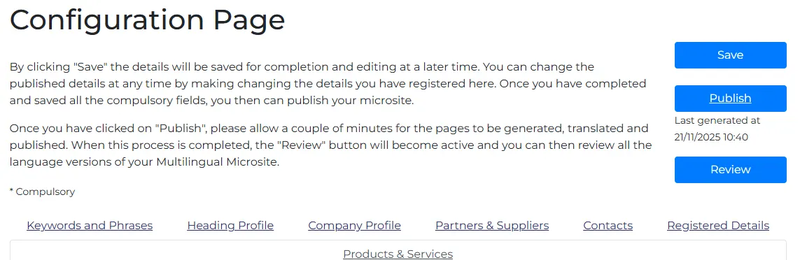
Briefly, there are 7 Sections to the Configuration Pages:
- Keywords and Phrases: Add the keywords and phrases that identify and distinguish your company, its products and services. (See also TTS’s eGuide: SEO – The Importance of Keywords and Phrases.)
- Heading Profile: The company name, logo, trademarks, web address - and the all-important company description and your own subdomain.
- Company Profile: Trading address, turnover, employees, industry sector(s), product classification(s), sales contact.
- Partners & Suppliers: Membership of Chambers of Commerce & Industry Associations, criteria for new partners and suppliers.
- Contacts: General, sales, purchasing, business partner and product managers.
- Registered Details: Company Certifications & Licences, Date of Registration, Registered Number and Address, and VAT Number.
- Products & Services: Detail your main products and services - including the option of uploading brochures, price lists etc.
If you don’t finish the configuration in a single session, this is no problem. By clicking “Save”, the details will be saved for completion and editing at a later time. By clicking “Save" and "Publish”, the details will be saved and the Microsite published online. You can change the published details at any time by editing the details you have already registered.
Please note that the first time you complete and save the company profile, it may take a few hours before your Multilingual Microsite is visible online. This is because it will take this time for your unique subdomain to be registered across the internet. Thereafter, changes should only take a few minutes before they are visible online.